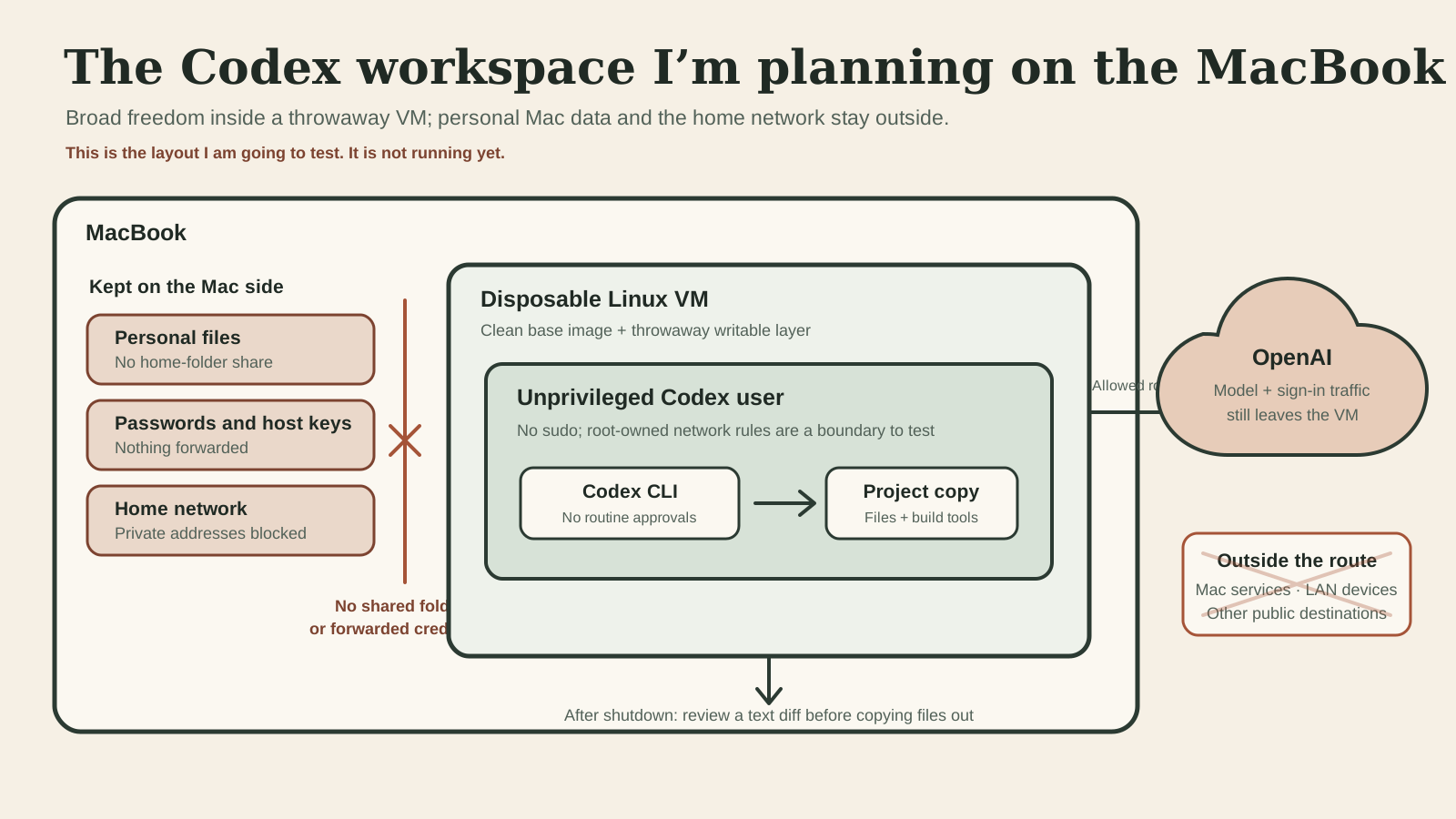
I want Codex to install tools, edit every file in a project, run tests, and keep going without asking me to approve routine commands. I do not want that freedom to include the rest of my Mac.
Nothing is running yet. I am preparing a disposable Linux virtual machine where Codex will have broad access inside one unprivileged account. The VM will get no shared Mac folders, no forwarded host credentials, and no route to devices on my home network. I will review the work before copying anything into the real checkout, then throw the VM away.
Codex helped me research and write this plan, and Codex will be the workload I isolate. The model will not run locally: model and sign-in traffic still go to OpenAI. This experiment is about limiting what Codex can reach on my Mac, not making an offline assistant or promising that a service keeps no data.
Two boundaries, not one
“Full access” and “sandboxed” cannot describe the same layer. OpenAI’s sandbox and approvals guide says its local full-access mode does not apply a filesystem or network sandbox. That is useful inside an outer boundary, but it cannot also be the boundary.
My outer boundary will be a Linux VM backed by Apple’s Virtualization framework. Codex will run as a normal guest user with no sudo. Unix permissions are intended to let it change that user’s project checkout and tools while keeping the root-owned base image and network policy outside the account’s control. The first test will check that boundary.
I plan to start from a clean base image for each job and keep the writable layer disposable. The Mac’s home folder, Keychain, SSH agent, clipboard, camera, microphone, USB devices, and private network will not be attached. Apple treats shared directories as an explicit VM feature; I will leave them out while Codex is running.
The guest will use NAT rather than a bridged network, but NAT alone is not the privacy control. A rule outside the guest must block the Mac and private address ranges, then allow only the destinations needed for Codex model and sign-in traffic. I will not configure web search, browsers, connectors, or MCP servers for the first test. The base image will already contain the build tools, so the agent does not need open-ended package downloads.
Any credential readable by the guest account is readable by Codex. I will therefore use a separate credential that I can revoke after the run, using the narrowest authentication option available—never a copied Mac login or forwarded agent. OpenAI’s authentication guide explains that the sign-in method determines whether ChatGPT workspace policies or API organization policies apply; I still need to choose and document the one I actually test.
Proposed Codex settings
Inside the VM, this is the small configuration I intend to start with. OpenAI’s configuration reference describes each of these keys.
sandbox_mode = "danger-full-access"
approval_policy = "never"
web_search = "disabled"
allow_login_shell = false

[history]
persistence = "none"

[analytics]
enabled = false
The first two lines deliberately remove Codex’s own filesystem and network sandbox and its approval prompts. The VM and its unprivileged account must do the containing. The other settings disable the web-search tool, reject login-shell requests, stop Codex from saving session transcripts to history.jsonl, and turn off analytics for this Codex profile. They do not stop the model and authentication connections that Codex needs.
I will keep the global Codex configuration out of the guest and build this file into the disposable image. That avoids silently inheriting a connector, trusted directory, or other setting from the Mac.
The first test
The trial needs a real job and deliberate failure cases. I will give Codex a small change in a throwaway copy of one project, then let it edit, run the checks, and recover from an ordinary test failure without approval prompts.
Before the run, I will create harmless canaries rather than point the agent at real private data: one file visible only on the Mac, one service reachable only on the home network, one blocked public destination, and one root-owned rule in the guest. I will also put a fake credential elsewhere in the guest user’s home folder. Codex should be able to find that guest decoy; that result would demonstrate why real credentials cannot live beside it.
The setup passes only if Codex completes the project change while it cannot read the Mac file, contact the local service or blocked destination, or alter the root-owned rule. After shutdown, I will inspect a text diff and copy only the files I accept into the real checkout. Then I will destroy the writable VM layer and confirm the clean image starts without the previous job.
If any host or network canary answers, the design fails. If the useful work requires a broad host share, a personal credential, or unrestricted network access, the design also fails; I will change the boundary rather than rename the risk.
What this would not prove
One successful run would show that these particular Mac, VM, account, and network boundaries held during one task. It would not prove that Virtualization framework, Linux, Codex, or my firewall rules have no vulnerabilities. It would not make project text safe to send to a model, and it would not establish how OpenAI retains or uses data under my eventual sign-in choice.
I have not chosen the VM runner, built the base image, verified the network rules, or run the canaries yet. Until those results exist, this is a design I am going to test—not a security guide or a setup I would ask someone else to trust.